
VX-5R mods & Information site
VX-5R mods & Information site
|
3:34 AM CST |
|
|

Page Contents:
| Breakdown of Serial Numbers |
|
|
|
|
|
|
|
Slow CTCSS decode, 865-869 blocked** |
|
|
|
Slow CTCSS decode, 865-869 restored** |
|
|
|
Fixed CTCSS problem*, 865-869 restored** in these radios |
|
|
|
Fixed CTCSS problem*, 865-869 restored** in these radios |
|
|
|
|
| Serial Number Details |
| Serial Number 9C031475 (9 is the production year) (C0 is the production run) (31475 is each radios own unique serial number) |
| Mars/Cap/Freeband Modifications |
 Mars/Cap or Freeband Modification For 1st & 2nd
Generation VX-5R's Mars/Cap or Freeband Modification For 1st & 2nd
Generation VX-5R's |
| 1) Remove Battery
2) Remove the Sticker/Cover for the Pressure Sensing Unit (SU-1) 3) Remove the SU-1 Pressure Sensing Unit Option Board (if installed) 4) Factory Configuration for USA VX-5R is X X X O O O X X (X = No Solder Ball O = Solder Ball) 5) For Mars/Cap, Remove The 4th Solder Ball - Your jumpers should look like this X X X X O O X X (X = No Solder Ball O = Solder Ball) 6) For Freeband, Remove The 4th & 5th Solder Balls - Your jumpers should look like this X X X X X O X X (X = No Solder Ball O = Solder Ball) 7) Reassemble Radio and Reset The Radio (Pwr-Mr-VFO-4) - You will loose all stored memory channels and custom settings and the radio is now modified Specific information on all 8 solder jumpers can be found here. Mars/Cap Modification Will
Expanded Transmit Frequencies to: Freeband Modification Will
Expanded Transmit Frequencies to: |
 Mars/Cap or Freeband Modification For 3rd
Generation VX-5R's Mars/Cap or Freeband Modification For 3rd
Generation VX-5R's |
| 1) Remove Battery
2) Remove the Sticker/Cover for the Pressure Sensing Unit (SU-1) 3) Remove the SU-1 Pressure Sensing Unit Option Board (if installed) 4) Factory Configuration for USA VX-5R usually looks like X X X O O X X X (X = No Solder Ball O = Solder Ball) 5) For Mars/Cap, Remove The 4th Solder Ball and Solder A Ball on the 6th Jumper (see note below) - Your jumpers should look like this X X X X O O X X 6) For Freeband, Remove The 4th & 5th Solder Balls and Solder A Ball on the 6th Jumper - Your jumpers should look like this X X X X X O X X 7) Reassemble Radio and Reset The Radio (Pwr-Mr-VFO-4) - You will loose all stored memory channels and custom settings and the radio is now modified Specific information on all 8 solder jumpers can be found here. Mars/Cap Modification Will
Expanded Transmit Frequencies to: Freeband Modification Will
Expanded Transmit Frequencies to: |
| Modification Notes for all 1st, 2nd, & 3rd Generation VX-5R's |
| Note: All 1,2 and 3rd Generations of the VX-5R ultimately modify the
same way, but the original factory Solder Ball configurations are
different. I've seen some mods posted that remove the 6th jumper
also during the Freeband mod. What I do know is that with the 6th
Jumper soldered, all repeater offsets in the 2M & 70Cm bands are
correct for the USA bandplan. For the USA version, so far there is
no way to open the cellular bands, or the cellular "images" in the 900Mhz
range. The farther you get away from the amateur band, the lower the
TX power will be. When you get to the extreme edges of the extended
TX bands the radio might show its transmitting, but actually there is
little or no power even though the display shown full scale on TX.
The radio's VCO might not even lock at the band edges - this is
normal.
With ADMS-1(X) software, after you mod your VX-5R, you will have to create a new template file in order for the ADMS software to recognize the mod. If you do not create a new template file, you will get an error trying to upload your freqs to the VX-5R. Simply create a new template file, and delete your old one. |
|
|
|
|
 |
There are two parts to EVE VX-5R programmer. The first part is Ver50, which contains all the necessary drivers for uploading and downloading. The second part is EVE, which is the graphical user interface(GUI). Download both files and unzip them to the same directory. EVE VX-5R can edit all memory channels, and all other functions of the radio. You can even perform Mars/Cap or Freeband modifications to your VX-5R with EVE. NEW Information Text can be found here. |

|
| A problem was discovered by Lawrence lately. This problem deals with the Home memory channels. If you do not upload the contents of your VX-5R to EVE first, then EVE defaults the Home channels to 0.00Mhz. When you try to access any home channel with 0.00Mhz in it, the radio will lock up. Most people have been uploading the contents of their VX-5R to EVE first, then editing their memory channels, so no problem will occure. The problem comes up when you open EVE and just start editing the memory channels with nothing uploaded to EVE. I recommend everyone first upload the memory contents to EVE first before editing anything. This holds true for "virgin" and well as programmed VX-5R's. Once you have saved your radios file in EVE, then everything should be just fine. |
| Note: It is normal for newer VX-5R's when read by EVE, to show up as "Japan" instead of "USA" for its country code - this is normal. This has to do with the newer CPU's used in the newer VX-5R's. There is no need to select "USA" for it's country code, just select the 4th box for Mars/Cap, or select the 5th box for Freeband if you intend to mod your radio. Also, if you hold your mouse over any of the 5 boxes for a few seconds, text will pop up stating what each "virtual jumper" does. |
|
|
 |
The ADMS-1(D)or(E) is software for programming the VX-1R, VX-5R as well as many other Yaesu radios. This software package comes with the PC programming cable. Cost is around $40 USD and is available from many Ham dealers. The latest version is the ADMS-1E. No Mars/Cap or Freeband modifications via software can be done with this software like EVE VX-5R. You can however use EVE first to mod your radio, then use ADMS for editing your memory channels (just make sure you make a new template file after using EVE). |
|
| Note: If you make any modifications (Mars/Cap or Freeband) to your VX-5R or VX-1R, whether it was a software mod or a hardware mod, you will need to make a new template (.tpl) file before you can upload to the radio again. Also, if you ever get a clone error while trying to upload to the VX-5R or VX-1R, make a new template (.tpl) file, and use that newly created template file when uploading to your radio. |
| Hints & Tricks for the VX-5R |
| To set any memory station as the priority
channel:
1. Dial to the channel you want set to be you
priority channel To update a memory channel without going to VFO mode: 1) Stop Scan - MR |
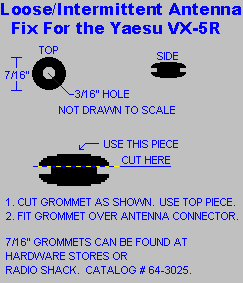
When using after market antennas, there is a small gap between the
radio, and the antenna. Use a small rubber grommet sliced in
half.to make a air/water tight seal between the antenna and radio.
Radio Shack (cat# 64-3025)sells an assortment pack that contain the right
size grommet for the job.
 |
| DEVIATION ADJUSTMENTS FOR THE VX-5R.
Some VX-5R's have very loud transmit audio, and can cause your audio to sound muddy and muffled - in extreme cases the audio will cause other radios/repeaters to "cut-off" your transmitted audio because it is above the levels set by these radio's/repeater's squelch settings. If your experiencing this problem, the first and easiest thing to try is to go into the VX-5R's menu settings (press [FW] then [BAND]) and select menu option 38. This is the Half Deviation setting - turn this on. With menu option 38 turned on, this will cut your transmitted audio in half - this should solve most peoples problems. If this does not solve your problem, then perform the modification to the right (Deviation Adjustments for the VX-5R). You'll have to remove the battery, and the black sticker and SU-1(if installed), this will reveal the potentiomenters that will need adjusting. |
 |
| When entering in alphanumeric tags, upper/lower case letters can be easily changed (saving a bit of knob twisting). The HM/RV and TX/PO buttons toggle upper and lower case when entering alphanumeric tags(saves a bit of knob twiddling). | The manual has an error in it for resetting the "Use Timer". To reset the timer, press and hold [6(RP)ONT] to display current usage, press F/W and hold for 2 seconds (radio will go into programming mode), then press the 6 key. Done. |
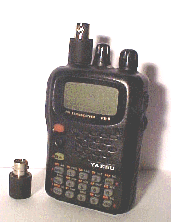 Use any BNC antenna with your VX-5R. High Quality SMA to BNC adapter |
 The name says it all! Pocket Reference for the VX-5R. My personal opinion: Just get one! |
| If you want to learn how to put your VX-5R into different country configurations or just want to learn more about what the individual solder balls do in the VX-5R Click here for details. | A nice VX-5R crib sheet can be downloaded here. |
| Mouser Electronics sells the 4 conductor 3.5mm plug for those who wish to make their own programming cable. The part # 171-7435. Thanks to Joseph C. for this information! | For some unknown reason, some VX-5R's might get stuck in "Memory Only Mode" - no extended RX or TX. Press [MR] while powering up the VX-5R to toggle between Memory Only Mode & Normal Mode. |
| Here is another source for the 4 conductor plug for those who wish to
make their own programming cable. http://www.shfmicro.com/coaxial.htm |
 |
| ALIGNMENT MODE FOR THE VX-5R |
| Enter by holding band+txpo+0 while powering up. VFOa must have valid ham frequency. First, make a note of the settings for your radio. Someday you might need these values to backup your radio. This process is not necessary to do, but it's nice to have a backup of these settings if something drastically goes wrong with your VX-5R Backing up your radios data with EVE or ADMS does NOT save these values, so they have to be done manually. This alignment mode also allows for adjusting the different power level stages and squelch settings. Here are mine: |
| Name | HF | VHF | UHF | Set Manually |
| HIS SQL | 0 | 0 | 0 | Yes |
| THIS SQL | 78 | 82 | 82 | No |
| TIGH SQL | 34 | 36 | 38 | No |
| S1 LEVELN | 100 | 90 | 82 | No |
| S9 LEVELN | 202 | 192 | 184 | No |
| S1 LEVELW | 36 | 44 | 32 | No |
| S9 LEVELW | 158 | 170 | 164 | No |
| HI POWER | 151 | 163 | 171 | Yes |
| L3 POWER | 97 | 107 | 117 | Yes |
| L2 POWER | 55 | 60 | 68 | Yes |
| L1 POWER | 25 | 28 | 31 | Yes |
| Pressing band changes among bands without need to reenter aligment
mode (VX-5 MR toggles set/display mode, dial changes settings on modes
marked YES above. Others will measure incoming signal and set to that
value. No way to directly enter (or restore) values, as the adjustments
have to be different for each radio, to compensate differences in
components, antenna, etc. If you accidentally enter one of these modes,
don't panic, just make sure you do not exit the alignment mode with the
HM/RV key. Again, DO NOT exit with HM/RV. No, better yet, just turn the
radio off before your panic fools you into remembering that you must press
the HM/RV key to escape. I tried to find a key to press that would exit
the set mode of TIGH SQL without turning the radio off, and voila' what
did I press in the sequence? HM/RV! (good news is that there are ways to
restore it without an rf generator, keep reading).
To adjust the power levels, enter set mode (MR in vx-5) and use the dial to set a value. Better yet, if you have a power meter (remember, that cheap one that says '2m power meter' might fry your radio at 440MHz), press PTT and set the dial while transmitting, very convenient. To set the S1 level, tune into a weak frequency that you would like to see as S1, then enter and exit the set mode (MR to enter, MR to exit, HM to save). To set the S9 level, tune into a strong signal that you would like to see as S9, then enter and exit the set mode (MR to enter, MR to exit, HM to save) These 'auto' modes are nice, as they double as an uncalibrated, tuned field strenght meter. You can numerically compare the signal of two different radios (or antennas) by observing the readings for each one. Just remember to exit by powering off, never that other key... In the vx-5 the readings seem to go from 14 to 100, lower for stronger signals. In the ft-50, from 0 (actually 40 or so without an antenna, noise...) to 255. To restore or change the auto settings, connect it to an HP RF generator, attenuator... What? WOuld you rather get a new car? OK, use your local repeater during ragchews as a signal source, proceed just as setting s-levels, above. Another way, more controllable is to use one YAESU in the power set mode (=continuously adjustable power output=power rf generator mode) and place it at a reasonable distance so you can force exactly the reading you want in the radio being set. I like to set L1power to 0, and assign that power level to some memory channels to absolutely prevent inadvertent transmission on them. Last comment: CLONE data does NOT include these settings (reasonably). I don't know, yet, if they can be uploaded to the radio. It might be possible, but most likely not. Thanks to Jose R. Camara for this information! |
|
|
| October 22, 2001 |
| AES has the VX-5R for regular price of $279.99 and VX-5RS for $299.99 (silver version). FT-50R for $209.99. Prices have certainly dropped. I can't see the radios dropping in price much more. At the price of new gear, used gear holds little value these days. Seen people selling used VX-1R's at Dayton 2001 for more than new ones that could be purchased in the Hara Arena. |
 |
 |
| Been having problems with the website and accessing it via FTP server. Hopefully it has been fixed, and updates will continue as needed. |
| Purchased the new Kenwood TH-F6A tripple band HT - what a piece of trash. Either I received a defective unit (doubt it), or this radio receives so much intermod/cross-channel bleedover, it is COMPLETELY useless. A constant S5-S9 static level on the Main Band in the 2M band while the 70cm band seemed fine. The oposite happens on Sub Band B, the 2M seems fine, while 70 cm has the S5-S9static level. You'd think Kenwood would take a little extra time on the first units shipped to make sure they are 100% functional, as not to get a bad initial feedback on their new almost $400.00 product. |
|
|
|
|
|
|
This Site Updated: October 22, 2001 (3:34
AM CST)
This Site Created:
January 14, 1999

