









 Lifehacker

by Adam Pash
Of all the great DIY projects at this year's Maker Faire, the one project that really caught my eye involved converting a regular old $60 router into a powerful, highly configurable $600 router. The router has an interesting history, but all you really need to know is that the special sauce lies in embedding Linux in your router. I found this project especially attractive because: 1) It's easy, and 2) it's totally free.
So when I got the chance, I dove into converting my own router. After a relatively simple firmware upgrade, you can boost your wireless signal, prioritize what programs get your precious bandwidth, and do lots of other simple or potentially much more complicated things to improve your computing experience. Today I'm going to walk you through upgrading your router's firmware to the powerful open source DD-WRT firmware.
What you'll need:
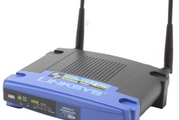
- One of the supported routers. I used a Linksys WRT54GL Wireless router that I picked up from Newegg, and the instructions that follow detail the upgrade process specifically for that router and its close siblings. If you're upgrading one of the other supported routers, you might want to look into instructions specific to your router. These instructions may generally work for other supported routers, but I'm not making any promises.
- The generic DD-WRT v23 SP1 mini firmware version located here.*
- The generic DD-WRT v23 SP1 standard firmware version located here.*
*You'll be upgrading the firmware twice, first using the mini firmware, then using the standard.
Upgrading your router to the DD-WRT firmware
Check out this gallery for the detailed step-by-step upgrade with screenshots. When you're finished, come back here for some of my favorite tweaks.
 Update, October '07: Reader Josh Harris writes in:
All the new WRT54G routers being sold now are v8, and the previous DD-WRT software didn't work on them. However, recent versions added support for the new v8 router— but it's a little more in depth.Got this to work on the WRT54G v8 (should work on 7 as well, just replace the files with the corresponding 7 version):
First of all, use IE explorer. Firefox didn't work at all on this for me, even after install. Second, go to this page. Read the textfile carefully and follow its instructions. Two edits to the textfile:
1. Make sure you go to command prompt and type
ipconfig /all. Record the default gateway, the subnet mask, and the two DNS addresses. When you set the IP address manually on your desktop/laptop to192.168.1.100as per the instructions, you will need to set these 4 numbers as well.2. Don't forget when you do the tftp that you need to be in the folder that contains the downloaded
dd-wrt.v24_micro_wrt54gv8.binfile (for example, if it is in C:/Downloads, type/cd C:/Downloads).Lastly don't forget you need to be on a wire to the router, and download both
vxworkskillerGv8.binanddd-wrt.v24_micro_wrt54gv8.binbefore you start. Following this procedure will install the micro version on your router.After this, switch your laptop/desktop back to receiving your IP address via DHCP rather than the manual configuration you set as per the instructions. You will be able to access the DD-WRt micro install via
192.168.1.1with the login usernamerootand the passwordadmin. From here, you still need to install the DD-WRT standard.Unfortunately, you cannot go any farther than this with WRT54G v7 and v8 because Linksys downgraded the physical memory in these recent models. However, micro is still an improvement over the original Linksys firmware.
Boost your wireless signal
The first thing I did after I finished the firmware upgrade was give my wireless signal a much needed boost ("needed" in the sense any signal boosting that can be done needs to be done, right?). Doing so is trivial.
Go to the Wireless tab, then to Advanced Settings. Find the entry labeled Xmit Power, which is set by default at a paltry 28mW, and can be set up to 251mW. To be honest, I don't know much about the science of the whole process, but I do know that 251 is WAY bigger than 28. However, you probably don't want to pump it up to 251mW right away.

The DD-WRT manual suggests that a "safe increase of up to 70 would be suitable for most users." Anything too much above that and you'd be flirting with overheating your router and damaging the life of your router (though I've heard that many people have pushed it up to 100 or above). So go ahead and change your Xmit Power to 70 and click the Save Settings button at the bottom of the page.
I can't measure for sure how the signal boost has improved things for me since I've just moved into this apartment, but I can say that the signal is full bars pretty much anywhere I go. How's that for scientific?
Throttling your bandwidth by program
While most routers treat one request for bandwidth the same as any other, your new $600 router is a step above. By setting up QoS (Quality of Service) rules, you can give priority to your interactive traffic (like VoIP, web browsing, or gaming) while throttling traffic that doesn't require a steady rate of bandwidth to function (like P2P programs).
Doing so will ensure that even if your network gets clogged with lots of file sharing, you'll still have enough bandwidth left over to make all of your free SkypeOut phone calls. If you've got roommates who tend to sponge up a lot of bandwidth, you can even prioritize by IP address.
What to do if you brick your router

If, god forbid, while flashing your firmware you end up "bricking" your router, don't worry - all is not lost. The DD-WRT wiki (a great resource of all things DD-WRT) can help you recover from a bad flash.
Of course, your router will handle securing your network, port forwarding, and all the other things your regular old router does.
Obviously I've just scratched the surface here, so if you decide to try this out, there's a lot of potential for other things you can do. Any readers tricked out a router with DD-WRT or one of the other open source distros? Tell us what tweaks have worked for you in the comments or at tips at lifehacker.com.
Adam Pash is an associate editor for Lifehacker who loves a good signal boost. His special feature Hack Attack appears every Tuesday on Lifehacker. Subscribe to the Hack Attack RSS feed to get new installments in your newsreader.




Comments
Great feature Adam! This is something that I've been meaning to do for some time. I initially downloaded the software months ago - and just never touched it. My goal for "tricking out" my router is to add VPN functionality. With your article as motivation, hopefully I'll tackle the task this weekend. I'll let you know how it turns out.
The DD-WRT firmware has been good to me. My favorite use is having it serve my VPN, so I can connect to my LAN from anywhere I have an internet connection. It's useful to have a dynamic IP address (try dyndns.org. QoS is the reason I bought the router--works wonderfully for Skype and VOIP. For a while I would SSH to the router in order to Wake-on-LAN my desktop, but with VPN service, I can just send out a WoL broadcast to the subnet. This firmware can do many other tricks as well. BTW, I remember some controversy about whether the Xmit power degrades your signal. Might be worth Googling.
Anybody have any ideas if they are planning on expanding the supported routers to include, say, D-Link routers?
I agree with the transmit power issue. My router tends to be a lot more stable at right below 100 than 150 (two settings that I have used for a while). I bumped it up to 150 this weekend and I have had to reset the router every evening this week.
unfortunately this hack only works with the linksys wireless router John. I think there is something about how it is made that made it hackable, I also have a linksys but not the wireless one and I'd gladly take an alternative firmware as mine is incredibly unstable.
Of the routers on the list of compatible ones, is this the best router to get? Or is there a better choice. Is the S model of this one better? What about one of the Buffalo models?
I've been meaning to get around to this too, but have been wary about bricking my router. Anyone have any experiences with bricking and subsequently recovering a router?
I had been meaning to do this for a while, and finally got around to it this past weekend. It is worth noting that dd-wrt is not the only option. The other notable alternative firmwares are OpenWRT and HyperWRT which are also free and open source. Each has their advantages and disadvantages which you should look up if you are looking into this. I ended up choosing dd-wrt as Adam did. So far my experience has been nothing but great. I'll go over some of the features I am using: I haven't had much of a chance to play with Xmit yet, at the moment I put it at 50 and am quite happy, though I'll experiment more with this after exams. QoS (also known as traffic shaping on other routers) makes me wonder how I ever lived without it. I was able to play UT over the internet with a ping of 30 while running 3 torrents. To me, this ability is reason enough to upgrade to an alternative firmware, and I regret sitting on such a great router for 2 years before doing it. The final feature of dd-wrt that I'll talk about, considering this post is getting rather long, is Static DHCP. This allows me to always assign the same IP to a specific MAC address over DHCP, essentially allowing me to set Static IPs without setting anything in the OS. You're able to set static IPs with the standard firmware, but not like this. This is the easiest way I've used to do it, and I much appreciate it. I'm probably going to get into more features as time goes on. Suffice it to say, if you have a hackable router I highly recommend you check out the options and expand your possibilities from the limited Linksys firmware.
Yet another "I've been meaning to do this!" to add to the group. I really have; the hack has been out there, but this is a beautiful walkthrough of how to get it done. Thanks! Additionally, for dynamic DNS issues, can anyone suggest good, stable options? Dydns is a good one, but I'd been using Selfhost for a while and now it looks like it's dead and gone.
@Admiral Ackbar: Yes, the WRT54G series is widely considered the most hackable router (read: easiest to hack) you can get. If you're buying new go for the WRT54GL as Adam got. If you are looking to save some money, try to find a WRT54G used. You'll need one of the older versions, as the newest one is incompatible with most alternative firmwares, and a complete pain with those for which it is compatible. You can check the version # either on the bottom of the router, on on the serial number on the outside of the box. Just google for the serial number and it will tell you what version you have. @Shawn: I wouldn't worry too much about bricking the router. If you go to the dd-wrt wiki (http://wrt-wiki.bsr-clan.de/index.php?title=DD-WRT_Docu_%28EN%29) you should have all the info you need. Just follow the upgrading instructions to the letter and you should be fine. They also have information about recovering from a bricked router, as Adam mentioned, but I honestly don't think it's too much of a worry.
How timely. I just put DD-WRT (the VPN version) on my router this weekend and I'm still tinkering with the options. The main reason I did it was to have static DHCP, where MAC addresses in the table always get handed the same IP from the DHCP server (very handy if you use any port forwarding). If anybody's got any good tips or links for setting up the VPN, they'd be greatly appreciated.
@phoenix: DynDNS is the standard, another one I have used is No-IP (www.no-ip.com). Never had a problem with it, but it is not compatible with dd-wrt or any of the other alternative firmwares. dd-wrt reports to be compatible with DynDNS, TZO, and zoneedit.
http://forums.hardwarezone.com/showthread.php?t=998127 This link has a good list of many custom firmwares available for the Linksys Of interest, is also a section on adding a script that will prevent the router from tracking old dead connections... this will prevent the router from locking up when too much P2P traffic is going on.
.....I "bricked" a Linky a couple of years ago when the power went out while I was flashing updated firmware. (Yeah, I had a UPS on the computer, but none on the router. Doh! I've got an old APC 300 va unit on my network hub stuff, now...) Fortunately, I had been suckered into buying one of those CompUSA replacement deals when I bought the Linky. After 30 minutes of fussing at the recurring red "diag" light, they gave me a new, better model, because the one I had bought was discontinued!
Hey all. Please be advised that your signal strength is subject to federal, and possibly state and local regulations. I can't find the federal limits, but the feds have been known to track down rogue over-limiters, and ignorance is no defense ;-) Have fun, but play smart.
RE - Xmit Power Setting: I don't know about the Linksys routers, but on the Cisco equipment I work with (during the day job), the higher the power output of the wireless signal, the quicker it drains the batteries of the wireless devices associated to it. It's very prevalent in Cisco's cordless 7920 IP Phones...Can't say how it translates to laptop batteries, but have to assume there's a similar effect. All that said, I'll be boosting my Linksys with this howto later this evening... Thanks Adam!
I've been following dd-wrt since its born of the sveasoft alchemy project (it's now based on the Open-WRT project), and I have to say it has far surpassed anything I ever expected. Brainslayer, the projects' main developer, has done some amazing work. Like many I started using it for the power increase ability, but there are just so many more options in there that make it really equivalent to a $600 router. One of the features I like most is the ability to assign static IP's based on mac address. This makes port forwarding much easier in a house full of laptops. The WDS feature allows you to pair up multiple routers to extend your wireless footprint to a much larger area. It also makes for real easy sharing of LAN's and Internet access between your neighbors. The Access Restrictions come in handy for keeping your roommate from viewing his favorite por... i mean, uh, news sites. There's a built in PPTP client and server for joining multiple routers over the Internet into a vpn; road warriors an also use this to log into the network while afar. It has the ability to let you create your own hotspot using chillispot, a radius server, and page redirection. And if you have an XBOX, you can use dd-wrt to jump on the Kaid network and stop paying for xbox live. @Admiral Ackbar: The general consensus is the the older model WRT54GS models (version 3 and below [see wiki to find out your version]) are the best because they come with twice the flash and ram. You can still find these if you look, there were still a bunch out at my local compusa about a month ago. @wallacetheweasel: There is a add-on for No-Ip, just search the wiki.
I just wanted to second the suggestion of looking at Open WRT, I've had great success with it. The Linksys WRT54g doesn't natively support being just an access point (all or nothing, baby). I had a client saddle me with a honking Netlink vpn box so I installed Open WRT on my Linksys. Worked like a charm.
That said, it wasn't the easiest to figure out, but I'm guessing neither option is for the faint-hearted!
@sblue That script is no longer needed with the latest version of dd-wrt. I don't know about the other firmwares, but dd-wrt no longer tracks connections for insane lengths of time (http://www.utorrent.com/faq.php#Special_note_for_users_with_Linksys_WRT54G_GL_GS_routers) @AyeRoxor I was reading about the legal limits in the forums, I can't find the link right now. Basically, laws are very lax in North America and you can go as high as you want. In Europe you are much more limited, I forget what the exact amount is, but as long as you are putting something reasonable (50-120 or whatever) you should be fine. It doesn't matter however, because you really don't want to be maxing it out. First of all, at levels that are too high, the signal degrades. Second, it increases the heat and will thus decrease the life of your router. Third, it's very disrespectful to your neighbours, as it will drown out their signal.
I use openWRT and is pleased to see that my Asus wl-500gx router now is stable and can run several progs in the background. I have an torrent downloader, swap, samba, ftp and dyndns service thanks to www.openwrt.org and www.macsat.com Macsat har great tutorials for oleg and openwrt firmware. This also proofs (for me at least) that linux is extremly powerful
I have installed linux on my router for almost a year now but i never really turned it to a 600$ router. I will try the signal boost for the wifi, i have a few dead spots in my backyard :) Thanks for the tips.
I've been using the DD-WRT software for some time now on my older WRT54GS (pre GL, back when all WRT's ran linux in the firmware). I've bumped the radio to 200 mW without issue. I live on a farm and the nearest neighbour is quite a distance from me, so there's no chance of me interupting their stuff, and I've tested just to be certain.
Total router hacker noob, here. I don't even know what I've really gained from doing this (that's how HARDCORE a
follower, er lifehacker I am). For those that are intimidated by the techie nature of this hack but want to get a $600 anything for a wee 60 clams (that you've likely already paid), it really is a simple and easy hack.If you're buying an old Linksys WRT54G, the serial number has to start with CDFA or CDFx (where x is a number). If it starts with CDFB that means that it is the updated version 5 of the Linksys router which means no Linux inside because Linksys switched to a closed format now. They brought out the WRT54GL to satisfy those that preferred having a modifiable Linux software.
People should be aware that the firmware enables remote web administration by default, on port 8080. I'm not sure if it's enabled by default on these routers out of the box or not, so maybe the replacement firmware isn't any different in this, but either way it's a very good idea to change it. At least change the password.
I've been using my WRT54G v4 with TheIndividual's Alchemy firmware for ages and it's rock stable. Not to mention a whole host of features. OpenWRT is great with their packages.
Adam, thanks for this. I'm drooling (well, not quite, but almost) to get this process started on my Linksys router.
I have been using third party firmware for about three years and love it. All sorts of problems solved. First you have to know what the problems are. Here is a list of the different firmwares. http://www.linksysinfo.org/portal/forums/showthread.php?t=...
I like this site for information. The firmware I have used is called Thibor and is an update of HperWRT. Stable and just the features I need, not much more.
just an FYI, i have ddwrt running on a v6 linksys wrt54g (the current model as of Aug '06. there are a couple extra steps for post version 5 units, but it was still pretty easy.
Anyone know if the CompUSA 54 Mbps Wireless G Broadband Router can be firmware upgraded this way??? I did a Flash upgrade from their site...but not sure if it can handle this one....(I am such a N00B) Otherwise its time to go buy a new router :)
Thanks
FEEDBACK PLEASE!
I just bought a WRT54G version 6 router 54Mbps broadband and I went to download the first firmware but I saw that the latest download was a version 4-so should I still download version 4 or does it not matter? Thank you in advance for any help. Any updates on this post would be great!
wow... sooo many options.
Thanks for the alk-through, worked brilliant!
This is very interesting, and I will probably do this to increase power and options in my Linksys WRT54G router. A couple of questions:
1) Will I still be able to make routine settings changes using the browser based settings page provided with the router by Linksys, or will I need to find the corresponding settings on the interface provided by DD-WRT or a similar program?
2) Will DD-WRT or similar software allow me to use my WRT54G as an access point for free WiFi service provided by my city, while it continues to serve as a router for my DSL connection?
I do believe that the federal maximum for transmission power is 250mW. Not too sure about any state regulations.
Just because you increase your signal power from the router, doesn't mean your laptop can reciprocate. That is to say, your laptop could hear your router, but might not be able to 'shout back' loud enough for it to hear. After all, it is a 2 way conversation that you have with your network. This of course is the same trick the cellphone/wireless networks are pulling. Just because they boost the power on their towers, thereby increasing your 'bars', doesn't mean your phone can give a very impressive return signal - and that's why the service still sucks.
For those who haven't got one of these WRT54G linksys boxes, you may want to turn your old pc into a wi-fi access point by putting in a hostap compatible pci card. It's a more attractive option, than hacking a linksys box, if you keep your desktop running 24/7 anyway, say to do p2p downloads. It can be more energy saving (depending on how old your machine is), and saving some silicons. You can also, like what I did, stream your music from the old pc, host a web server, play with traffic shaping (or qos), set up vpn server for remote connections, run a vncserver for graphical remote access (i've just given away my crt monitor to save space). Stick an antenna to the pci card and you can probably reach a meshap node around your area. Of course, this is only if you are interested in linux projects...
hi folks,
does this firmware provide any options that help you secure your network from outside attack?
i have a wrt54gsv4, and there is a NAS storage device attached to it. i am interested to find out how hackers can browse my NAS storage when my lappies are off, and prevent them doing so.
If you are going to do this, please do get the WRT54GL, Note the "L" as in Linux. Any current versions of the the WRT54G have reduced memory so you can only load the DRT micro version. The new versions of the WRT54G are crippled in other ways as well. So again, make sure it is the GL version. (I made this mistake once).
http://en.wikipedia.org/wiki/WRT54G
Tom's Networking Review, "Yes, the Linksys WRT54G V5 Really Is a Lousy Router:"
http://www.tomsnetworking.com/2006/06/08/linksys_wrt54g_v5...
I'd love to try this, it even adds WPA2 support! Unfortunately, I have a WRT54GC (C for compact), which doesn't appear to be supported.
Honestly I run dd-wrt on my WRT54Gv4 as well but most of these articles are misleading. They claim to turn the router into a 600 dollar router, I suppose implying that this is going to be half the router that a Cisco Aironet is, and you can't be further from the truth in the end.
An aironet setup will provide management features that these hacked routers will never be able to do. WLAN controllers that Cisco sells allow you to deploy common configs across all your APs in one single update instead of going to each AP and updating them time and time again. Router integration within various IOS modules and the 6500 service modules are also available. Cisco's MobileIP protocol that allows roaming among APs for "router in a trunk" deploymetns for police...ahh...I could go on and on about what you've got with the Ciscos that you can't get with these but then again...I guess most folks don't care.
I've got a question or three.
I have a wrt54g ver 2.
Is there enough space to do the mini and the standard upgrade to the router?
Also, it it easier to block websites by keyword without blocking all of my machines?
Linksys help just doesn't give enough help info either. It gives you 6 spaces for keyword blocking sooooo, can you add more than one word per space separated by a , : or ; ?
Last but not least, the instructions at the top state to upgrade to mini then standard dd-wrt.v23 SP1, however there is a dd-wrt.v23 SP2
listed....do i want this instead?
Outstanding Adam ..!!
And I'm clueless about Linux !!
Went in smooth .. (pretty much) and is soooooo much better then the crappy Linksys software.
And the coolest part is that I was just in here looking for info on different 'blogs' and just stumbled into this !!
Thanx again brother !!
did you use the sp2 or sp1 ?
On a related note, can anyone suggest a good source of info on the throughput performance of home 802.11 b/g wired routers with multiple active attached devices?
I'm looking for a new home router (w/ VOIP phone ports), since the Linksys router the Vonage folks supplied me with seems to be choking (OK, severely restricting) the throughput on my Internet connection. Specific model recommendations would be welcome also, if anyone is so inspired...
Most of the performance tests I've seen so far focus on range, with a single attached device. Problem is, my SO is a significant broadband user also ;-).
(I do realize that any attempt to measure throughput is very dependent on the test setup and conditions. That's fine - I'm looking for an order of magnitude improvement :-) so approximate and/or relative measurements are fine.)
bump
Hey I just implemented this on my very old (probably v1) WRT54G. I am running the standard version (v23 SP2). Everything seemed to be going quite smoothly, until...
QoS sucks. I set it up pretty much as described, and my web download speed went from 4800+ Kbps to in the 300s. Plus, I entered my Vonage router's MAC address as both "Exempt" and "Premium" and the sound quality on phone call was noticably degraded.
Unless I am missing something, I cannot understand why one would change things when my current speeds seem pretty darn quick and my sound quality is pristine. Maybe I did something wrong -- I don't get it.
I boosted my signal strength but have not been able to tell whether it helped much.
Hi!
I have a problem. after following the instructions here on upgrading my wrt54g firmware, i am not able to access the internet anymore because its asking for a uid and pw when I select PPPoe. When I initially plugged in my router(purchased it brand new), it worked well. It wasnt asking for any uid and pw. but after the firmware upgrade, its now showing that i need to type in those information. I have an ADsl connection and with the modem directly connected to my computer, its working fine. but when im connecting the router, its now asking for uid and pw. I called my ISP but they cant seem to give me an answer just yet and i need to wait 24 hours for their solution. Is there a workaround for this? I mean, not needing a UID and PW since my connection doesnt need it anyways?
HELP!
I have a Belkin 802.11g Wireless router, model F5D7230-4, however my version number is 6002.
Does anyone know of a custom firmware that is compatible with this router or not?
The firmware currently used is very ineffective, and has many problem.
Any help is appreciated.
maximum xmit power regulation by FCC (Industry Canada for Canada ) are for 802.11a devices (5GHz) Unlicensed National Information Infrastructure (UNII band) and 802.11b/g ISM (Industrial Scientific Medical) band is 1W. High power need not have to mean better signals. For every double the power there is only a gain of 3dB. Ten times the original power only 10dB gain. 1mW = 0dBm, 2mW = +3dBm, 4mW = +6dBm, 10mW = +10dBm, 100mW = +20dBm and 1000mW = +30dBm. Every 9dB gain doubles the range indoor (6dB outdoor). Reflection,Refraction ,Scattering, Diffraction,absorption , Antennae Polarization and Line of sight can vary the signal strength.
Awesome! This sounds great and I can't wait to try it. I thought I got hoodwinked buying an older linksys on sale at Staples but you just made me feel much better!
This is why I love lifehacker... Thanks!!
Hi,
Just recently upgraded the firmware on my ver. 6 WRT54G router. Everything seems fine was able to add get into the router using the new PW and Login and changed the xmit just like I had read. Only one small problem I am having is that I can't seem to get on the internet using the router I just upgraded. When I search for "networks" I'm able to see my router but can't get online. I'm sure this is a minor fix but I a little lost. Running Windows vista. Worst case scenario I have a nice paperweight.
update to above post - I did get hoodwinked: the wrK54g router that I got is a POS that is unhackable... So I switched it out with my moms wrt54g and hopefully she'll never know the difference!
NEAR BRICK: I subsequently almost bricked my 'new' router by using firefox to flash it - out of habit despite many stern warnings not to do so. I was able to connect to the router but not sign in - it would not accept the default username (root) and pswd(admin) when I typed them and hit enter. After freaking out I retryed and CLICKED ON OK instead of hitting enter and got in just fine. Needless to say I used IE to upgrade to ddrt standard and now all is well.
Thanks for the future hacking fun - looking foward to exploring the sshd features...
If only this was as easy to do on my Fon router. I managed to do it, but it took a lot longer than it would have if my router was a Linksys. Having to enable ssh, and then manually install the firmware was a pain. However, I am extremely happy with my results from doing it.
I've been using it for about a year on my Motorola WR-850Gs. Excellent firmware! The WDS support alone makes it worth it!
W00t! This totally worked and fixed our problem with range. Thanks for the tip!
Just be careful that you follow the instructions to a T.
I got a bit hasty and tried to upload the firmware over https, failing to notice that the instructions say that won't work.
My router would only give me a white screen, so I reset it, hoping that the default firmware would come back. But after I did that, it wouldn't even respond to a ping. I tried tftping the linksys firmware back to it (even though I knew that was not likely to help, since pinging didn't work).
I ended up following these instructions which were very helpful. I couldn't get it back until I got to "Revival Tip #3," which involved grounding one of the pins on the flash chip while plugging in the router.
After several hours wasted because of my own impatience, I was able to get the Linksys firmware back on to the router, upload the dd-wrt generic mini firmware, and then use that to upload the specific version I wanted (the vpn firmware for my version WRT54G v2.0).
Works great now.
I have been using this for about a year on my linksys wrt54gs v1 , and have installed it on dozen's since. This is by far one of the best things you can do for your home networking setup. I have worked with almost all of the settings and can say that I am truly pleased. I do have a handful of these available for sale at any given point in time, follow the first link for more info.
Best Regards,
The 3cWired Team
Behind every great fortune lies a crime.
www.3cwired.com - Web Design-SEO-Repair-Sales-Upgrades
www.galants.org - The Home for Galant Enthusiasts
www.locatemyip.com - More than just free IP displays
Dang, so I guess there's no hope for me and my shitty BEFW11S4 router is there :-/
I have a Belkin F5D7230-4 router and i'm thinking of flashing it with DD-WRT but i've read a lot about it (i have never done anything similar before) and it sounds like bricking is kind of common so i'd like to know how dangerous it actually is to kill your router by doing this. And also, how easy is it to go back to my router's original firmware if for some reason i don't want the DD-WRT firmware anymore?? Do I just upgrade back to my belkin firmware and it'll all be like it was at the beginning??
WOOT success! Bought a cheap buffalo whr-g125 and flashed it with dd-wrt. Was a pain getting the net tio work at first, had to figure out what my verizon user and pass were for the PPPOE settings but it was totally worth it. I now have a strong signal all the way up in my attic where my other computer is thanks to the handy dandy "boost" Thanks guys
Belatedly, I've just done this. Brilliant tutorial, and despite some of the previous posts it DOES work on a WRT54G.
More of these hack attacks please!
Thank you!!!
My V1.1 G kinda choked and I had to buy a new one on the spot. Best Buy only have version 8. So, alas, I'm SOL as for firmware options.
Linksys must really be a bunch of jack455es to intentionally kill off the power of these things.
If I wasn't desperate, I'd have made sure I got an appropriate version... so for now, I'm stuck without even the simple feature of assigning IPs based on MAC. Gr. Anyway, DDWRT is nice.
Got this to work on the WRT54G v8 (will work on 7 as well, just replace the one file with the corresponding 7 version):
First of all, use IE explorer. Firefox didn't work at all on this for me, even after install.
Second, go to this page - [www.dd-wrt.com]
Read the textfile carefully and follow its instructions. Two edits to the textfile- one, make sure you go to command prompt and type ipconfig /all. Record the default gateway, the subnet mask, and the two DNS addresses. When you set the IP address manually on your desktop/laptop to 192.168.1.100 as per the instructions, you will need to set these 4 numbers as well. Second, don't forget when you do the tftp that you need to be in the folder that contains the downloaded dd-wrt.v24_micro_wrt54gv8.bin file (for example, if it is in C:/Downloads, type "/cd C:/Downloads"). Lastly don't forget you need to be on a wire to the router, and download both vxworkskillerGv8.bin and dd-wrt.v24_micro_wrt54gv8.bin before you start. Following this procedure will install the micro version on your router.
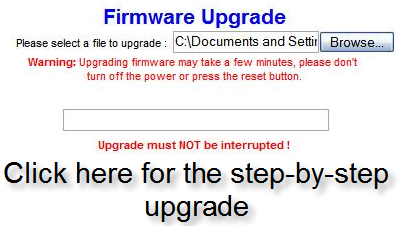
After this, switch your laptop/desktop back to receiving your IP address via DHCP rather than the manual configuration you set as per the instructions. You will be able to access the DD-WRt micro install via 192.168.1.1 with the login as "root" and the passwd as "admin". From here, you still need to install the DD-WRT standard. Go to [www.dd-wrt.com] and download dd-wrt.v24_std_generic.bin . Then, you can log into your DD-WRT interface, go to Administration>Firmware Upgrade and install the dd-wrt.v24_std_generic.bin file.
Viola! DD-WRT standard on the WRT54G v8.
I have a Linksys WRTP54G that I believed to be bricked due to an electrical storm (I did not have it plugged into a surge protector--the setup instructions even show plugging it into the wall outlet!) during the summer of '06. I hadn't gotten around to throwing it out, and it sat on my desk collecting dust for the last 15 months. I was cleaning my desk today, and thought I'd check LH to see if there was anything I could do as a last-ditch effort to save the unit from going to the electronics recyclers. Lo and behold, I used the method outlined to "recover from a bad flash" ( [www.dd-wrt.com] ), and it WORKED! Thank you, Lifehacker!!! Now, I dunno if the thing was never actually bricked, or if it was and has now been magically resuscitated (cue up defibrillator scene from ER), but whichever the case, it is working fine now!!! I'm glad I tried it!
well after suffering from many wireless disconnects after setting up my Linksys for wpa (wireless would cut out under load), I tried the firmware in this article, and - no more disconnects. Great stuff. I had tried another third party firmware, but same result.
after a couple of tries, i finally got the dd-rt firmware on my Linksys WRT54GS, everything's working fine, i made my range better, prioritized the laptops who gets more bandwidth, my Xbox 360 will get top priority, the only thing left is: what else is there I can do with a hacked in firmware? anyone, please enlighten me. Thanks.
i've extended my range on my Linksys WRT54GS, prioritized my laptops and PC's bandwidth, what else is there to do with a hacked in firmware?
I've just made a wireless bridge out of a $30 Buffalo WHR-G125. (Be sure to read the specialized instructions on the Wiki for flashing dd-wrt to Buffalo devices!) I'm a real network neophyte myself, but this really works! There's an easy-to-follow tutorial on using a dd-wrt-installed router as a bridge on WiFi planet:
[www.wi-fiplanet.com]
Has anybody else had trouble connecting to the 'net wirelessly after updating their router? My ISP is Charter (cable) so the connection type should be DHCP. Any help is much appreciated.
Thanks
after installing dd-wrt v23 sp2 on my linksys wrt54g v6 earlier this week and spending about 4 days tweaking it out, my connection has never been better!
i was dropping my connection randomly, unable to reconnect coming out of hibernation or standby (without rebooting), and many more speed/latency/connectivity issues.
now, however, pages load faster, connection doesn't drop, and my cpu is under significantly less load...making my computer not run so hot it's too warm to touch!
great firmware! spend the time u need tweaking it out after the flash!
i have a WRT600N router. Is there any 3rd party firmware out for it yet?
I upgraded my WRT54G v.2 firmware mainly to boost the wireless signals for my internet radio. the upgrade went smmothly and I increased the power to 70, as recommended, but the difference was negligible. I have an internet Radio(Pico Rivo) and I can get good reception only close to the router, say next room, about 10 metres away, and 3 brickwalls/partitions in between. I treid an "n" router before, a high gain antenna and a Linksys Range Expander, all were disappointing. this was my last hope, but I am still getting no joy.
the signals on my laptop increased by one bar but I never had problems with my laptop, even with the WRT54G on its own. I use DSL cable modem. any suggestions or comments? had anyone came across a similar problem? I know internet radios are relatively new in the market but any help would be much appreciated. thanks Adam.
There is a video guide on Youtube:
Part 1: Replace the original firmware to DD-WRT on a LinkSys WRT54GL
[www.youtube.com]
Part 2: Turn it into hotspot mode
[www.youtube.com]
I have a DDWRT-flashed WRT54G and am wondering if I can set it up as a remote range expander using another non-DDWRT unit? Or do I need two DDWRT units to do this? I know DDWRT supports the feature, I just don't know the hardware requirements.
The reason I ask this is I believe DDWRT is not compatible with the Linksys WRE54G (range expander) and I need an alternative. This is more a shortcoming of Linksys than DDWRT. They have this stupid "Auto Configuration" button and wizard when an ethernet port on the unit and the ability to hard-wire the it to my router to configure it would be so much better.
Any help would be much appreciated! Thanks!
I've been using Linksys routers forever with hacked firmware. Personally I prefer HyperWRT. DD-WRT I find flaky. The last time I tried it on a recent install of a new Linksys router it was resetting the router back to default settings on power off, and other nonsense. So, I would download HyperWRT as well, in case you run in to trouble. It's probably a good idea to have a competent friend help you if you're worried about messing things up. Make sure you have your settings and login info to restore everything. The later versions of Linksys firmware include a backup feature of your settings. Do a backup in case you have to go back to the plain Linksys firmware.
Now that I've upgraded to Verizon FIOS, my WRT54G is useless, so I'm thinking about trying to use it as an access point for my office downstairs (I have a MacMini, which has a notoriously weak Airport card). Is this possible with the WRT54G, or do I have to go out and buy an access point?
NIce
[squidoo.com]
dd-wrt is great, i really like it best, I have tried a few others myself, thers actualy quite a few firmwares available for the linksys.
this page [www.cyberpunkcafe.com] lists around 8 different firmwares. worth taking a peek if trying router firmwares is your thing ;-P
For those of us with WRT54G v5+, what are our best options since apparently neither Tomato nor DD-WRT work.
Also, just out of curiosity WHY won't it work? Not enough memory or something?
I followed the posted instructions and installed DD-WRT on a new WRT54GL - that was easy. Then I configured the router as a local dynamic DHCP server, using the same basic parameters I had on my old router.
Everything seemed to be working great, but then I tried to use Windows Network Places to access another computer in the same Windows Workgroup. Doh! The PCs show up in My Network Places, but they are all unaccessible. After a long lag, I get a lot of "network path cannot be found" type messages.
With the same configuration and the same router using Linksys firmware, Network Places worked just fine. Anyone know why?
This just might be the trick I needed to open my VPN account to all my other computers...
My Vpn provider has been working with me to try to provide a solution so my other computers on my home network don't each require a login and password to surf. I'd like to be able to connect my router and have DHCP do the rest. I'm amazed that there is not a marketed solution out there yet for this.
In any case, I will post back. If anyone has any experience in hooking up a router with a VPN service provider ( mine is [www.strongvpn.com] please let me know. I'm sure their support can help, but I'm also looking for multiple solutions so I can market it.
I have a wrt54g vs 6. When I go to install the new firmware, I received an error message that says "Upgrade are failed!". I am quite baffled since 1 it is bad English and two because I believe I am doing everything correctly. Any suggestions would be most welcome.
When I go to install the firmware it gives me an error and says "Update are failed!". I have a wrt54g v5. Suggestions are welcome.
Hi Folks,
Very interesting reading... Too bad I didn't see this before I hardwired remote locations because of wireless signal loss. :(
As a point of interest, I did a little more research and found a pre-designed retail source. I'm not affiliated and can't offer an endorsement on the product, but for those that don't want to take the time to do their own hack, it may be a viable alternative.
Link: [stores.ebay.com]
They offer an upgraded WRT54GL router / antenna combo.
Matthew
Hey guys. I'm looking to get a new linksys router. and i'm contemplating getting either the wrt150n model or the wrt54gl model. It's only a 10 dollar difference between the two so not sure which one to get. From what I understand, I can use the linux firmware on both. I figured since the 150n model works off the N technology, it would be better for the long run, but that's just my guess. What do you guys recommend?
hey guys. im looking to get a new router at home and I'm contemplating whether to get the WRT54GL or the WRT-150N. I'm pretty sure they both allow for the linux firmware. To my knowledge, the 150N is a pre-N router and from what I heard, you can use the linux firmware to make it a full fledged N configuration. That's the only difference I know really. There's only a 10 dollar difference between the two so I'd like to see what you guys recommend. If you guys can help me out, that would be super. thanks =)
I used dd-wrt on my wrt54g few days ago and it worked on the first try!
No errors or anything. I use this as a wireless bridge, so I love it for this purpose. NO need to buy wireless adapters for my htpc or xbox.
I'm a newbie, and I've figured out how to do all the steps in Vista, including activating the TFTP function, except that I would really appreciate help with the very first step!
"1. Make sure you go to command prompt and type ipconfig /all. Record the default gateway, the subnet mask, and the two DNS addresses. When you set the IP address manually on your desktop/laptop to 192.168.1.100 as per the instructions, you will need to set these 4 numbers as well."
How do I manually set the IP address in Vista? Also, when I type ipconfig /all it only gives me one DNS server address (10.0.0.2). What do I input for the second one?
I really appreciate your help taking me from "complete newbie" to "somewhat newbie" (and yes I know that this process isn't meant for complete newbies, but I'm prepared to learn the hard way).
Many thanks!
to manually setup IP address in Vista, go to Control Panel and switch to "classic view" Then click on "Network and Sharing Center". Then on the left hand side you should see "Manage network connections" Click on that and you will finally get to the place you need to be. Right click on either your Local area connection or your wireless one, depending on which one you are trying to set up a manual IP and go to properties.
From here on out i'm not sure on the details. It's either the "IPv6" or the
"IPv4" properties where you can enter the manual IP address. Not sure what the difference between the two is so I can't tell you which one to do it in. About the DNS server address, I believe it depends on your ISP. I only have one too. Just enter that one. you don't need two. Good luck
I picked up a WRT54G/v8.2 at Walmart last week. Knowing full well it probably wasn't DD-WRT compatible, but I thought I would give it a shot. Followed these directions and it worked perfectly.
One question I have though is upon investigation the DD-WRT firmware indicates the router has a Broadcom chip and 8mb of RAM. I was under the impression that all the newer WRT54G have 2mb and thus the need for the micro firmware install. Is this just an anomaly of the diaplay of info or does this router actually have 8mb of RAM?
Did the dd-wrt mod to my router and its worked awesome for 3 days. Now I cant get on the internet via wired or wireless. I thought it might be the cable company, so i contacted them. They had me bypass the router and I'm back online. I put in another stock, out the box Linksys router, and still no connection. Any ideas as to what I'm doing wrong or what happened?
olds442111 ... try estalishing your MAC address cloning ... in the old days cable companies used to control your access via the MAC address that was used to register the service ...
most have done away with that
when your router (after mod) renewed its IP address ... the cable comapny may have picked up a different MAC address ... hence why you laptop works directly to the modem and doesnt through the router ...
also ... you may want to verify it has the correct DNS servers ...
good luck ...
I have just upgraded to the DD-WRT firmware.
Everything wen smoothly.
Now, when I run eMule, I am not able to use the internet at all. It just does not load any pages.
I guess, eMule is eating up all the bandwidth.
I tried setting up QOS, but it wont let me change the ports the eMule is using.
As soon a I disconnect from eMule, my internet works fine again.
Can somebody help me solve this issue please?
Hi I Live in a campground and have trouble getting the signal fron there router Liknsys to my trailer . I have a linksys router at my end end i recently got 2 external wifi antenna. What is the best firmware to connect my linksys to theirs ? I may not be able to access the router on the main end . I want to be able to connect my desktop and 2 laptop computers wirelessly . I can get another linksys router if i have to also . Any help is appreciated thanks . .EL
when i try to upgrade it connects to a sever it wont let me select a file to upgrade to as far as i know can eny one pls HELP!!!
Highly recommend using Tomato, QOS works awesome (2-VOIP lines). WDS is really simple too. Runs circles around old dd-wrt. Tomato is very stable, up for over 8 months and no reboots. :)
Start a discussion:
Login with your username and password below. Or comment on this post via email.
Forgot your username or password? New User?