|
|
|
| X Window
System
The X Window environment in Slackware is provided by XFree86. X is responsible
for providing a graphical user interface. It is independent
from the operating system, unlike Windows or the MacOS.
The X Window System is implemented through many programs
that run in userland. The two main components are the
server and the window manager. The server
provides the lowlevel functions for interacting with your
video hardware, thus it is system specific. The window manager
sits on top of the server and provides the user interface. The
advantage to this is you can have many different graphical
interfaces by simply changing the window manager you use.
| |
| Picking an X
Server
The X server is specific to your video hardware. During the
Slackware installation, you are asked what servers you want to
install (in the "X" series). By default, we select the
XF86_VG16, XF86_SVGA, and XF86_FBDev servers to install on
your system. These are the most common ones for people to use,
and if you use the XF86_FBDev server, you don't have to
configure the server. Here's a description of the X servers
you can install.
| x3dl |
X server for cards using 3DLabs chips (XF86_3DLabs)
|
| x8514 |
X server for cards using IBM8514 chips (XF86_8514)
|
| xagx |
X server for cards using AGX chips (XF86_AGX) |
| xi128 |
X server for the #9 Imagine 128 (XF86_I128) |
| xma8 |
X server for cards using Mach8 chips (XF86_Mach8)
|
| xma32 |
X server for cards using Mach32 chips (XF86_Mach32)
|
| xma64 |
X server for cards using Mach64 chips (XF86_Mach64)
|
| xmono |
A Monochrome X server (XF86_Mono) |
| xp9k |
X server for cards using P9000 chips (XF86_P9000)
|
| xs3 |
X server for cards using S3 chips (XF86_S3) |
| xs3v |
X server for S3 ViRGE chips (XF86_S3V; obsolete, use
SVGA) |
| xsvga |
X server for most SVGA cards (XF86_SVGA) |
| xvg16 |
A 16-color generic X server (XF86_VGA16) |
| xw32 |
X server for cards using the ET4000/W32 chipset
(XF86_W32) |
| xxfb |
Generic framebuffer server for most VESA cards
(XF86_FBDev) |
The left column above indicates the Slackware package name
for that particular X server. The actual server name is given
in parentheses in the right column.
| |
| Configuring the X
Server
If you select the XF86_FBDev server, then you're
done. Just make sure that you have selected your desired video
mode during the LILO configuration (run liloconfig as
root). The server will use that video mode.
If you prefer to use a regular X server, you'll need to
build an /etc/XF86Config file specific to your system. The
easiest way to do this is to run
/usr/X11R6/bin/XF86Setup as root. It's a graphical
setup program for X. If that does not work, you can always use
/usr/X11R6/bin/xf86config. The setup program allows you
to pick your server, resolutions, color depths, and monitor
settings. Be sure to enter the correct information for your
system. | |
| Picking a Window
Manager
The last thing to do to setup your graphical environment is
to select a window manager. There are dozens available, and we
include a handful of them with Slackware. Run the
xwmconfig program to set the default window manager for
your system. This program will present a list of installed
window managers and let you pick one.
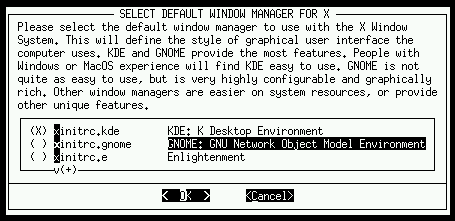
Desktop environments can also be grouped into this
category, as they are most closely related to a window
manager. KDE and GNOME are examples of desktop environments,
having a standard set of programs that look and act the same.
| | |